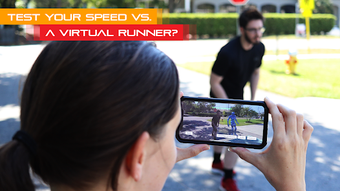

Download Sprint AR – sprint, running, AR, fitness, athletic, speed, training, 40-yard dash, AR runner, sprinting, fitness tracker, running app
Overview
Sprint AR is a mobile application designed to help users evaluate their sprinting performance using augmented reality technology. The app simulates a competitive 40-yard dash by placing a virtual runner in real-world space, allowing users to race against an AI-generated athlete. It serves as a tool for individuals interested in measuring their speed, improving athletic performance, and gaining insight into professional sprinting benchmarks. The app is particularly suited for sports enthusiasts, fitness beginners, and anyone with a personal interest in running speed and physical conditioning.
By leveraging augmented reality, Sprint AR enables users to visualize how fast they are running in comparison to elite-level athletes. The experience is immersive and interactive, providing real-time feedback through visual and recorded data. Users can set the race duration between 4 to 7 seconds, which allows for short, focused sprints that mimic real training drills. The app is developed by Nateception Studios, a company focused on innovative AR experiences in sports and fitness. It is available for free on both Android and iOS platforms, with no advertisements or in-app purchases, ensuring an uninterrupted user experience.
Real-world usage scenarios include personal training sessions, fitness tracking at home, or recreational testing in open spaces such as parks or driveways. The app’s reliance on AR surface detection means it functions best in well-lit environments with flat ground. While the developer did not provide additional system requirements, the app is recommended for devices with advanced AR capabilities, such as those equipped with Lidar sensors.
Key Features & Capabilities
- Augmented Reality Sprint Simulation – Users can race against a virtual runner in real-world space, providing a dynamic and immersive experience that mimics a professional 40-yard dash.
- Customizable Race Duration – The app allows users to set sprint times between 4 and 7 seconds, enabling short, high-intensity training sessions ideal for fitness and athletic development.
- AR Surface Scanning & Placement – The app uses the device’s camera and AR technology to scan the ground, detect a flat surface, and allow users to place the starting line with precision.
- Multiple Viewing Angles – Users can adjust their position and angle to record the sprint from their preferred perspective, enhancing replay quality and personal analysis.
- Automatic Recording & Video Save – Once the race begins, the app automatically records the sprint, and users can save the video directly to their device’s camera roll for later review.
These features are designed to support personal fitness tracking and athletic training. For example, a high school athlete can use the app to compare their sprint speed to a simulated elite runner, helping them set performance goals. A fitness enthusiast might use it to track progress over time by recording multiple sprints and reviewing improvements. The ability to save video footage allows users to analyze form and stride, making it a practical tool for self-assessment. The app’s integration with AR ensures that the experience feels realistic and engaging, promoting consistent use.
User Interface, Workflow & Performance
The user interface of Sprint AR is designed to be intuitive and focused on the core sprinting experience. The main workflow begins with scanning the ground using the device’s camera. The app guides users through the process, highlighting when the surface is detected and ready for placement. Once the surface is recognized, users can position the starting line and adjust the orientation before beginning the sprint.
Navigating through the app is straightforward, with minimal on-screen distractions. The interface emphasizes real-time feedback and visual cues during the race, ensuring users remain focused on performance. The app automatically starts recording when the race begins, eliminating the need for manual controls during the sprint.
Performance observations are based on general software behavior patterns. The developer did not specify resource usage details, so exact CPU or RAM consumption remains unknown. However, given the app’s size of 128MB and its reliance on AR, it likely performs efficiently on modern smartphones with sufficient processing power. Stability is expected to be consistent, especially on devices with advanced AR capabilities. The app does not require a constant internet connection, making it suitable for offline use in various environments.
Compatibility & System Requirements
Sprint AR is available for both Android and iOS platforms, making it accessible to a wide range of mobile users. The app was released on March 1, 2024, and is currently available on the Google Play Store. The installation size is 128MB, which is relatively compact for an AR-based application.
Platform compatibility information is limited. The developer recommends using the app on the latest generations of iPhones or iPads with Lidar sensors for optimal AR performance. While the app supports Android, specific device requirements were not listed. The developer did not provide additional system requirements, including minimum processor speed, RAM, or storage recommendations. Compatibility with older devices is uncertain, and users are advised to check their device’s AR capabilities before downloading.
Pros and Cons
Pros
- Free to download and use with no ads or in-app purchases
- Immersive AR experience that simulates real sprinting competitions
- Supports customizable sprint durations (4–7 seconds)
- Automatic recording and video saving to camera roll
- Intuitive interface focused on user performance and feedback
Cons
- Exact system requirements were not listed
- Performance may vary on older or non-Lidar devices
- Relies on proper lighting and flat surfaces for AR accuracy
- Only available on Android and iOS, no desktop or tablet support
- Video recording quality details were not specified
FAQ Section
Is Sprint AR available for Windows or Mac?
Sprint AR is currently only available for Android and iOS devices. There is no version for Windows or Mac operating systems.
Does Sprint AR require an internet connection?
No, the app does not require a constant internet connection. It can be used offline after installation, making it suitable for use in parks or open spaces without network access.
Is the app safe to download and use?
Yes, Sprint AR is free from ads and in-app purchases. It is available on the Google Play Store and was developed by Nateception Studios. Users are advised to download only from official sources to ensure security.
How often can I update Sprint AR?
Updates are automatically available through the Google Play Store or Apple App Store. Users should check for updates regularly to ensure they have the latest version with potential improvements and bug fixes.
Can I use Sprint AR without a Lidar sensor?
While the app is recommended for devices with Lidar sensors, it may still function on other smartphones with AR capabilities. However, AR accuracy and performance may be reduced on devices without advanced depth-sensing technology.
Final Thoughts
Sprint AR delivers a unique and engaging way to test and track sprinting performance using augmented reality. Its focus on real-world application, combined with a free and ad-free model, makes it an attractive option for fitness enthusiasts and sports-minded individuals. The app’s intuitive workflow, customizable race settings, and automatic video recording enhance its value as a personal training tool.
While system requirements and performance details are limited, the app’s design and functionality suggest strong potential for users seeking to improve their speed and running technique. It is best suited for individuals with modern smartphones, particularly those with advanced AR features. The lack of ads and in-app purchases ensures a clean, uninterrupted experience.
For anyone interested in measuring their sprinting speed, understanding elite athlete benchmarks, or simply enjoying a fun and interactive workout, Sprint AR offers a compelling solution. Download Sprint AR now.







